
Video Encryption SDKProtect Video Files with AES-256 Encryption
The Video Encryption SDK allows users to encode video in MP4 H264/AAC format and apply encryption using either a password or binary data. Within this SDK, DirectShow filters are provided for seamless integration into any DirectShow application. These filters come with implemented interfaces for simple configuration of filter parameters, simplifying the process of securing your video content.
From €500/year · Lifetime from €1500
Key Benefits
Advanced H264 Encoding
Full control over profiles, levels, bitrate, and quality
AES Encryption
AES-128 and AES-256 stream encryption support
GPU Acceleration
Optional GPU usage for faster encoding
Major Features
- H264 encoder profiles/levels, bitrate, quality, and other properties support
- Optional GPU usage for encoding
- Multiple audio streams support
- HD and 4K video support
- x86 and x64 versions
- AES-128 and AES-256 can be used for stream encryption
- Multithreading support
Implementation Details
SDK can use string, files, and binary data as encrypting keys. SDK uses an open AES-256 crypto algorithm to encrypt video and audio streams. You can seek encrypted video files like any other video file. AAC codec will be used for an audio stream, and H264 codec will be used for a video stream. Also, you can re-mux any source H264/AAC file or stream without reencoding.
Video Encryption SDK is already integrated into Video Capture SDK .Net, Video Edit SDK .Net, and Media Player SDK .Net but requires an independent license.
AES-256 may require licensing in some countries. SDK can also use AES-128 for compatibility. Please get in touch with us if you want to use alternative encryption algorithms.
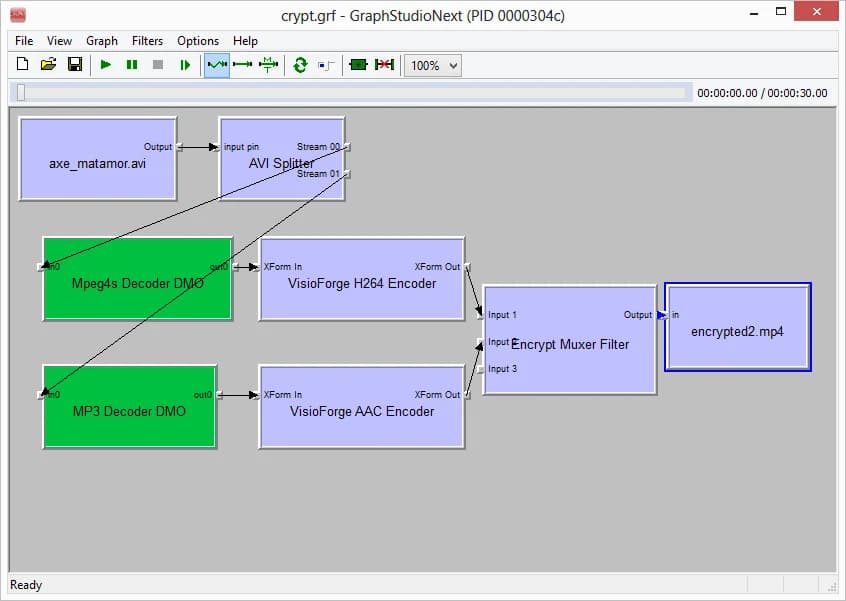
Video Encryption SDK can be used in any DirectShow code as two filters: muxer (encryptor) and demuxer (decryptor). Seeking is supported for demuxer.
You can use SDK as a core of your DRM video files system.
Filter Usage in DirectShow Graph
The SDK provides two DirectShow filters that can be integrated into any DirectShow application for encryption and decryption of video content.
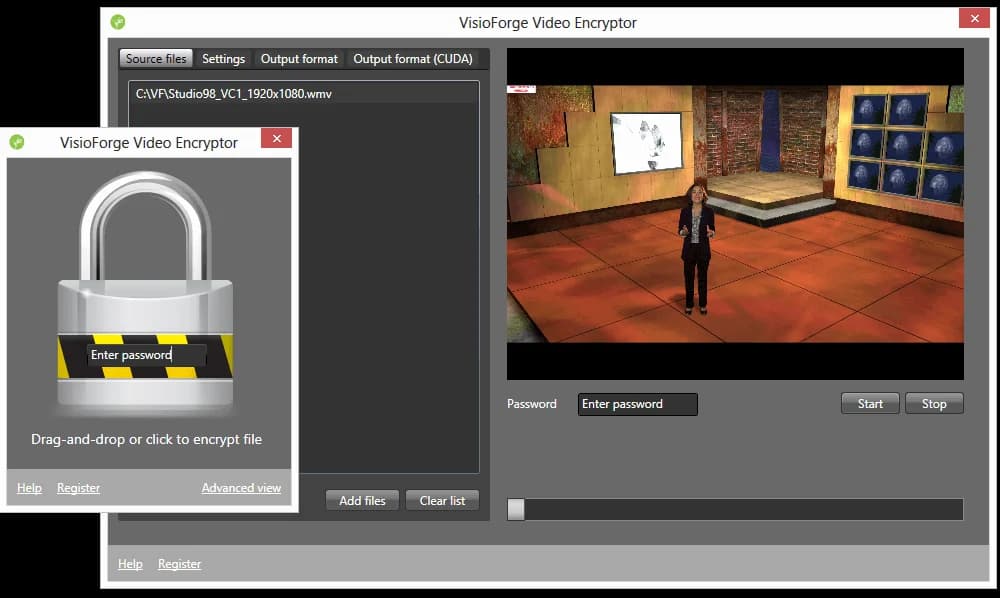
Video Encryptor App Sample
The Video Encryptor sample allows you to protect your video files with a password. All popular video formats are supported. You can use your favorite media player to play protected files. The app uses the Video Encryption SDK as an engine and supports Nvidia CUDA technology to increase encryption speed (on computers with Nvidia graphics cards).
System Requirements
Operating Systems
Windows 11, Windows 10, Windows 8/8.1, Windows 7, Windows Vista, Windows Server 2012 and later
DirectX
DirectX 10 or later
Related Products
Explore our other DirectShow and .NET SDKs for comprehensive video processing solutions.
Video Capture SDK .NET
Capture video from webcams, IP cameras, and screens with advanced processing features.
Video Edit SDK .NET
Edit and process video files with transitions, effects, and encoding capabilities.
Media Player SDK .NET
Play video and audio files with hardware acceleration and custom rendering.
Distribution Rights
Royalty-free distribution
Trial Limitations
The fully functional trial lasts 30 days. Depending on the SDK engine and output, it may display a watermark or an unregistered notice.
Purchase Benefits
Purchase of Video Encryption SDK will give you the following benefits:
- Unlimited usage
- No nag-screen
- Free minor and major upgrades within one year (after one year, SDK will work the same as before) for a regular license
- Minor and major updates for the product lifetime with Lifetime·Team
- Email support
The regular license is billed annually and automatically renewed each year. You can cancel your subscription at any time.
Pricing Options
Choose the license that best fits your needs
Regular License
Annual subscription
- Unlimited usage
- No watermark or nag-screen
- minor and major updates for 12 months
- AES-256 encryption support
- GPU acceleration support
- Email support
- Royalty-free distribution
- Cancel anytime
- Commercial use allowed
Lifetime·Team License
One-time payment with minor and major updates for the product lifetime
- Unlimited usage
- No watermark or nag-screen
- minor and major updates for the product lifetime
- AES-256 encryption support
- GPU acceleration support
- Email support
- Royalty-free distribution
- One-time payment
- Commercial use allowed
Need custom encryption algorithms or special features? Contact us for tailored solutions.
Source Code License
Source code licensing is available by request for this SDK. Contact our sales team to discuss pricing and licensing terms.
Request Source Code LicenseReady to Secure Your Video Content?
Download the trial version to test all encryption features with your DirectShow application. Full documentation and sample code included.
Build with AI coding agents
Pairing with an AI agent — Claude Code, Cursor, GitHub Copilot, Gemini CLI, OpenAI Codex? VisioForge publishes machine-readable surfaces for Video Encryption SDK so your agent gets the integration right the first time: the right NuGet packages, license registration, project setup, and the cross-platform deployment details it would otherwise have to guess at.
Connect the MCP server
MCPAdd the VisioForge MCP server to your agent for contextual help — search the API, look up classes and members, fetch working code examples, and pull deployment guides, directly inside your editor.
Claude Code
claude mcp add --transport http visioforge-sdk https://mcp.visioforge.com/mcpVS Code (.vscode/mcp.json)
{
  "servers": {
    "visioforge-sdk": {
      "type": "http",
      "url": "https://mcp.visioforge.com/mcp"
    }
  }
}Prefer to feed the entire documentation to your agent? It is also available as plain markdown: /llms.txt · /llms-full.txt
Frequently Asked Questions
What is the Video Encryption SDK?
The Video Encryption SDK is a software development kit that enables developers to encrypt and decrypt video and audio files using AES-256 or AES-128 encryption algorithms. It provides DirectShow filters (muxer for encryption, demuxer for decryption) that integrate into any DirectShow application, allowing you to build custom video content protection and DRM systems.
What encryption algorithms are supported?
The SDK supports AES-256 (256-bit Advanced Encryption Standard) as the primary encryption algorithm and AES-128 for broader compatibility. Encryption keys can be provided as text strings, file paths, or binary data. The SDK encrypts both video (H.264) and audio (AAC) streams independently within an MP4 container.
Can I seek within encrypted video files?
Yes. The SDK's decryptor (demuxer) filter fully supports seeking, so users can navigate to any position in an encrypted video file just like a regular MP4 file. This enables standard media player controls including fast-forward, rewind, and jumping to specific timestamps.
Which programming languages are supported?
The SDK provides APIs for C# (.NET), VB.NET, C++, and Delphi. For .NET developers, the VisioForge.DirectShowAPI NuGet package provides convenient interface wrappers. The SDK is also integrated into Video Capture SDK .Net, Video Edit SDK .Net, and Media Player SDK .Net (separate license required).
Can I encrypt live streams or only files?
The SDK can encrypt both pre-recorded files and live streams. The muxer filter works within a DirectShow filter graph, so it can encrypt output from any source — including live camera feeds, screen captures, and network streams. You can also re-mux existing H.264/AAC content without re-encoding for faster processing.
Is the encryption compatible with standard media players?
Encrypted files require the SDK's decryptor filter to play back. Standard media players cannot open encrypted files without the decryptor component installed. This is by design — it ensures only authorized applications with the correct decryption key can access the protected content, making it suitable as a foundation for DRM systems.
What are the differences between the trial and commercial versions?
The trial version is fully functional for 30 days and may display a watermark or an unregistered notice. Paid licenses include royalty-free distribution rights and email support. Annual licenses include 12 months of updates; Lifetime·Team licenses include minor and major updates for the product lifetime.
Are there export restrictions on AES-256 encryption?
AES-256 encryption may require export licensing or compliance with regulations in some countries. The SDK also supports AES-128 as an alternative for regions with stricter encryption export controls. Contact VisioForge if you need guidance on encryption regulations or require alternative encryption algorithms for your target markets.