
Video Edit SDK FFmpeg .NET — Video Processing & Conversion with FFmpeg in C#
Video Edit SDK FFmpeg .NET is a C# FFmpeg SDK for video editing in WinForms, WPF and console apps on Windows. It joins and trims clips with transitions, effects and text overlays, and exports MP4, MKV, WebM, MOV or MPEG-TS with GPU H.264 and HEVC encoding.
From €250/year · Lifetime from €750
FFmpeg-powered video editing SDK for Windows with 1000+ format compatibility. Modern codecs, filters, and professional features.
Key Benefits
1000+ Formats
Extensive format support via FFmpeg
Windows Native
DirectShow + FFmpeg.exe pipeline on Windows
Modern Codecs
H.265, VP9, and AV1 support
FFmpeg-Powered Features
Leverage the power of FFmpeg for professional video editing
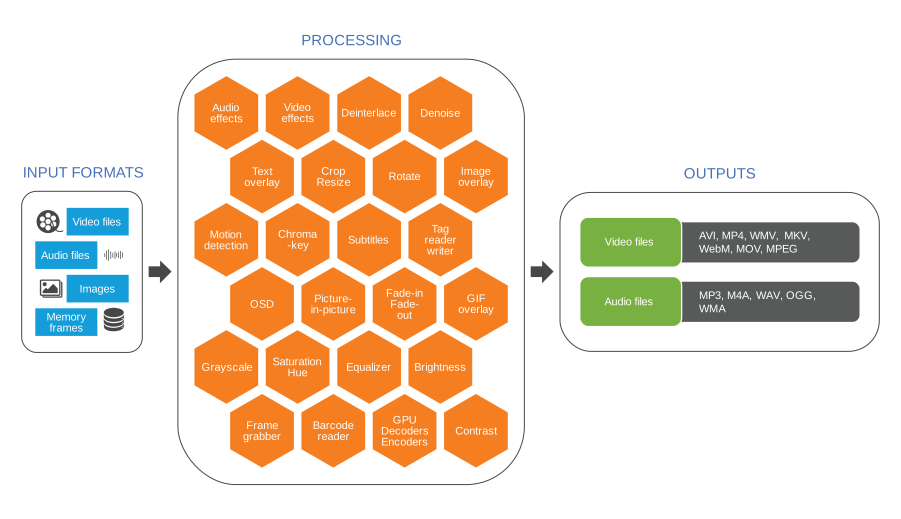
Video Input Formats
- AVI
- MPEG-1/2
- WMV
- 3GP
- QuickTime MOV
- MPEG-4/H264 (AVC)
- Any other format supported by FFmpeg
Audio Input Formats
- WAV
- MP3
- OGG
- WMA
- AAC
- Any other format supported by FFmpeg
Image Input Formats
- BMP
- PNG
- GIF
- JPEG
- TIFF
- WebP
Output Video Formats
- AVI
- MP4
- MKV (Matroska)
- WMV (Windows Media Video)
- Quicktime MOV
- WebM
- AV1
- MPEG-1/2/4
- FLV
- Many others
Output Audio Formats
- WAV (PCM/ACM)
- Ogg Vorbis
- MP3
- WMA (Windows Media Audio)
- AAC
- Speex
- FLAC
- OPUS
Video Processing & Effects
- Image overlay (PNG, animated GIF)
- Resize and crop
- Pan/zoom
- Text overlay
- Brightness, contrast, saturation, hue
- Chroma-key (green screen)
- Denoise
- Deinterlace
- Motion detection
Audio Processing & Effects
- Volume booster
- Equalizer
- Many other effects
Barcode reader
- QR Code
- UPC-A, UPC-E
- EAN-8, EAN-13
- Code 39, Code 93, Code 128
- Codabar
- ITF
- RSS-14
- Data Matrix
- Aztec
- PDF-417
Encoding parameters
- Video size
- Frame rate control
- Video/audio codecs
- Video/audio bit rate
- Quality
- Profile/level
- Other Features
Licensing
Deploy on Windows with one license
Choose Your License
FFmpeg-powered video editing SDK licensing
Annual licenses include 12 months of updates and email support; Lifetime·Team licenses include both for the life of the product
Standard
€750lifetime, €250 / year
- Timeline
- Frame grabber
- Video processing
- Audio processing
- HD/4K support
- Chroma-key
- Motion detection
- OSD (On-Screen Display)
- Multiple output screens
- Output formatsAVI, WMV (Windows Media Video), WMA (Windows Media Audio), WAV, MP3, Ogg Vorbis, Speex
Professional
€1,000lifetime, €350 / year
- Timeline
- Frame grabber
- Video processing
- Audio processing
- HD/4K support
- Network streaming (WMV)
- Chroma-key
- Motion detection
- OSD (On-Screen Display)
- Picture-In-Picture
- Multiple output screens
- Virtual Camera SDK output
- Video rotation
- Output formats+, DV video, Flash Video (FLV), WebM
Premium
€1,500lifetime, €500 / year
- Timeline
- Frame grabber
- Video processing
- Audio processing
- HD/4K support
- Network streaming (WMV)
- Chroma-key
- Motion detection
- OSD (On-Screen Display)
- Network streaming (RTMP/RTSP/UDP)
- Picture-In-Picture
- Multiple output screens
- GPU-accelerated video effects
- Virtual Camera SDK output
- Video Encryption SDK support
- Video rotation
- Output formats+, MPEG-1/2/4, MP4
Annual licenses cover one named developer; Lifetime·Team licenses cover the purchasing organization's developers at one location in one city. Both include email support.
Annual includes 12 months of minor and major updates. Lifetime·Team includes them for the product lifetime.
Source Code License
Source code licensing is available by request for this SDK. Contact our sales team to discuss pricing and licensing terms.
Request Source Code License💰 Save More with Bundle Packages
This product is included in our cost-effective bundle packages. Get more products for less than buying them separately.
.NET Bundle Professional
Includes:
- •Video Capture SDK .NET (Professional)
- •Media Player SDK .NET (Professional)
- •Video Edit SDK .NET (Professional)
- •Video Edit SDK FFmpeg .NET (Professional)
- •Media Blocks SDK .NET
.NET Bundle Premium
Includes:
- •Video Capture SDK .NET (Premium)
- •Media Player SDK .NET (Premium)
- •Video Edit SDK .NET (Premium)
- •Video Edit SDK FFmpeg .NET (Premium)
- •Media Blocks SDK .NET
System Requirements
Windows requirements and dependencies
| Operating Systems |
|
| .NET Framework |
|
| Hardware |
|
Documentation & Support
Complete guides for FFmpeg integration
Build with AI coding agents
Pairing with an AI agent — Claude Code, Cursor, GitHub Copilot, Gemini CLI, OpenAI Codex? VisioForge publishes machine-readable surfaces for Video Edit SDK FFMPEG .NET so your agent gets the integration right the first time: the right NuGet packages, license registration, project setup, and the cross-platform deployment details it would otherwise have to guess at.
Connect the MCP server
MCPAdd the VisioForge MCP server to your agent for contextual help — search the API, look up classes and members, fetch working code examples, and pull deployment guides, directly inside your editor.
Claude Code
claude mcp add --transport http visioforge-sdk https://mcp.visioforge.com/mcpVS Code (.vscode/mcp.json)
{
  "servers": {
    "visioforge-sdk": {
      "type": "http",
      "url": "https://mcp.visioforge.com/mcp"
    }
  }
}Prefer to feed the entire documentation to your agent? It is also available as plain markdown: /llms.txt · /llms-full.txt
Frequently Asked Questions
What is Video Edit SDK FFmpeg .NET?
Video Edit SDK FFmpeg .NET is an FFmpeg-powered video editing and converting SDK for .NET developers. It enables video timeline editing, format conversion, effects processing, and encoding in C# and VB.NET applications. Built on the Windows VideoEditCore engine that encodes via FFmpeg.exe (FFMPEGEXEOutput), it supports 1000+ media formats and runs on Windows.
What formats and codecs are supported?
The SDK supports virtually any format available in FFmpeg, including MP4, AVI, MKV, WebM, MPEG, MOV, and FLV containers. Video codecs include H.264, H.265/HEVC, VP8, VP9, AV1, ProRes, and MPEG-1/2/4. Audio codecs include AAC, MP3, OGG Vorbis, FLAC, Speex, Opus, WAV, and WMA. Image formats like PNG, JPEG, BMP, and animated GIF are also supported for overlays.
Does it support cross-platform development?
No. This FFmpeg-engine SDK is built on the Windows VideoEditCore engine (a DirectShow pipeline that encodes via FFmpeg.exe) and runs on Windows only (7 through 11, Server 2012+). If you need macOS or Linux support, use the cross-platform Video Edit SDK .NET, which is powered by the VideoEditCoreX (GStreamer) engine.
What .NET frameworks are supported?
The SDK supports .NET Framework 4.7.2 and later, .NET Core 3.1, and .NET 5 through .NET 10. It works with WinForms, WPF, console applications, web backends, and Windows services. The SDK is distributed via NuGet for easy integration into any .NET project.
Does it support GPU-accelerated encoding?
Yes. The SDK leverages FFmpeg's hardware acceleration support for encoding with NVIDIA NVENC, Intel Quick Sync Video, and AMD VCE/AMF. GPU-accelerated encoding significantly reduces processing time for H.264 and H.265/HEVC output, especially for HD and 4K content.
Can I apply filters and effects during editing?
Yes. The SDK provides extensive video effects including image and text overlays, brightness/contrast/saturation/hue adjustments, deinterlacing, denoising, chroma-key (green screen), rotation, resize, crop, pan/zoom, and motion detection. Audio effects include equalization, normalization, and volume boosting. FFmpeg's full filter graph capabilities are available for advanced processing.
How does it differ from Video Edit SDK .NET?
Both products are based on the Windows VideoEditCore engine and run on Windows only. Video Edit SDK .NET encodes through native DirectShow/Media Foundation filters, while Video Edit SDK FFmpeg .NET configures the same engine to encode via FFmpeg.exe (FFMPEGEXEOutput) — giving broader format/codec coverage (1000+ formats, AV1, VP9). Choose the FFmpeg version for maximum format support on Windows; choose the standard version for native DirectShow integrations. If you need genuine cross-platform support (macOS, Linux), use Video Edit SDK .NET's VideoEditCoreX (GStreamer) engine instead.
What are the differences between the trial and commercial versions?
The trial version provides full functionality for 30 days and may display a watermark or an unregistered notice, depending on the engine and output. Paid licenses include royalty-free distribution rights and email support. Annual licenses include 12 months of updates; Lifetime·Team licenses include minor and major updates for the product lifetime. Standard, Professional, and Premium feature tiers are available.