
Video Edit SDK .NET — Cut, Merge & Process Video in C#
Video Edit SDK .NET is a video editing SDK for WPF, WinForms, MAUI, Avalonia and Unity apps in C#, on Windows, macOS, Linux, Android and iOS. It trims and joins clips on a timeline with transitions, effects and titles, and exports MP4, WebM, MP3, AAC and more with hardware-accelerated encoding.
Cross-platform support for Windows, macOS, Linux, Android, and iOS
From €250/year · Lifetime from €750
The VisioForge Video Edit SDK .Net allows programmers to integrate advanced video editing and processing capabilities into their software applications. With this SDK, you can create custom movies by combining audio and video files, applying various effects, and smoothly transitioning between tracks. The SDK provides robust support for popular video formats, including MP4, WebM, AVI, WMV, Matroska, MPEG-1/2/4, and others. It also offers the flexibility to work with additional file formats using third-party DirectShow filters. Moreover, you can export audio in the most popular formats, including MP3, AAC/M4A, OGG Vorbis, Windows Media Audio, OPUS, Speex, and WAV, adding versatility to your multimedia projects.
Installation
Quick Installation with NuGet
Get started in seconds with our NuGet package
Install-Package VisioForge.DotNet.VideoEditOr search for VisioForge.DotNet.VideoEdit in Visual Studio's NuGet Package Manager.View on NuGet.org →
Key Benefits
Timeline Editing
Multi-track timeline with precise control over video and audio segments
Rich Effects Library
50+ built-in effects, transitions, and filters for professional results
GPU Acceleration
Hardware-accelerated rendering with Intel, NVIDIA, and AMD support
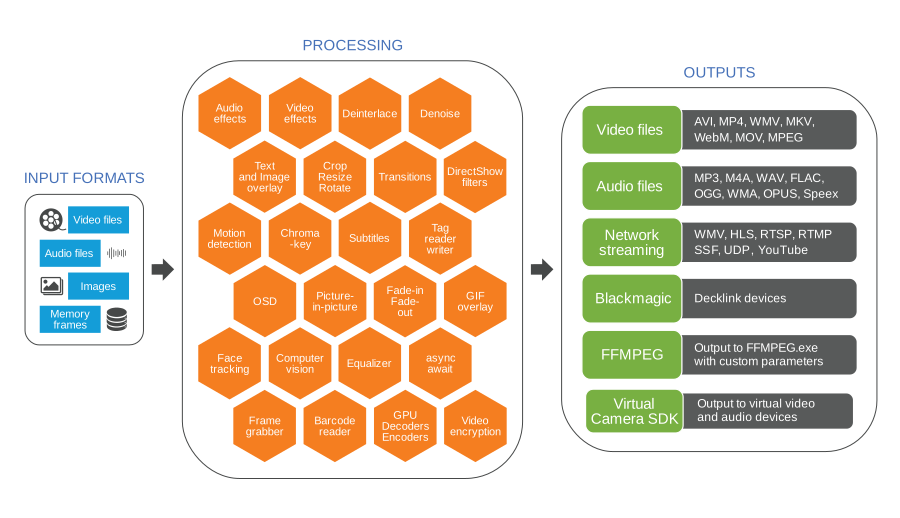
SDK STRUCTURE
The SDK provides compatibility with video, audio, and image files as input sources and allows you to include images from memory. It also provides access to over 20 different output file formats. You can stream the output over a network or send it to a Blackmagic card for further processing. This range of options and configurations ensures developers can efficiently handle multimedia content.
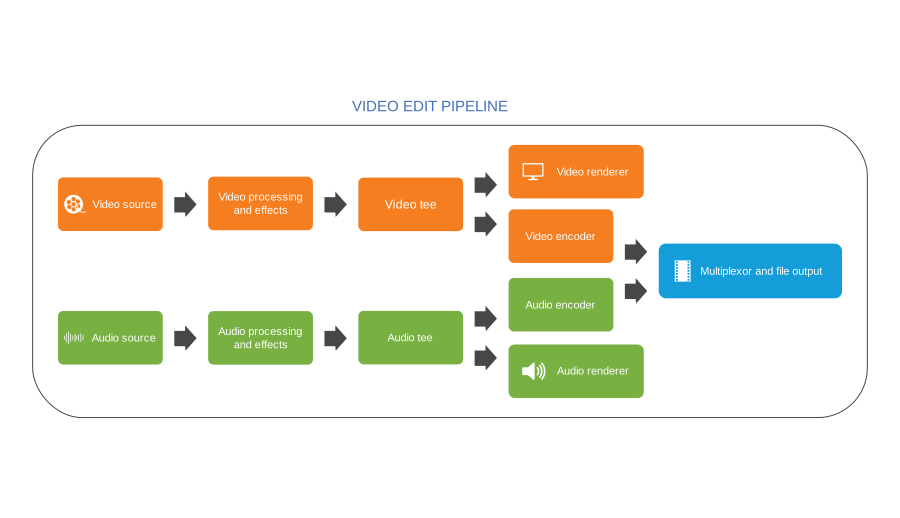
VIDEO EDITING PIPELINE
The SDK includes a timeline feature that enables creating and managing multiple video and audio tracks. Within these tracks, you can insert video and audio fragments. Then, following the decoding phase, the data becomes ready for processing and compression before being written to a file. This structured workflow facilitates efficient multimedia content handling within your application.
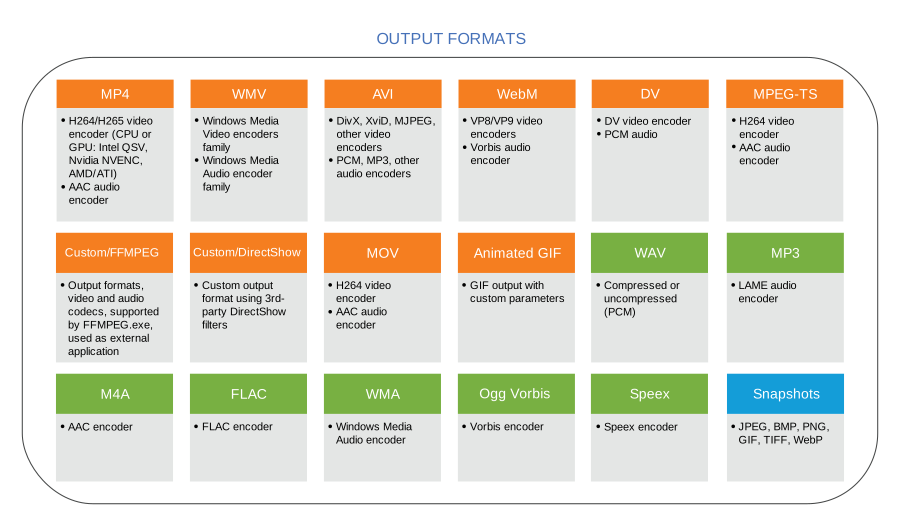
OUTPUT FORMATS
The SDK ensures robust compatibility with many popular video, audio, and image file formats and codecs, including MP4, WebM, AVI, WMV, MPEG-TS, MP3, AAC, JPEG, GIF, and PNG. Furthermore, developers can use their custom DirectShow filters for encoding, offering enhanced flexibility and customization options for multimedia processing.
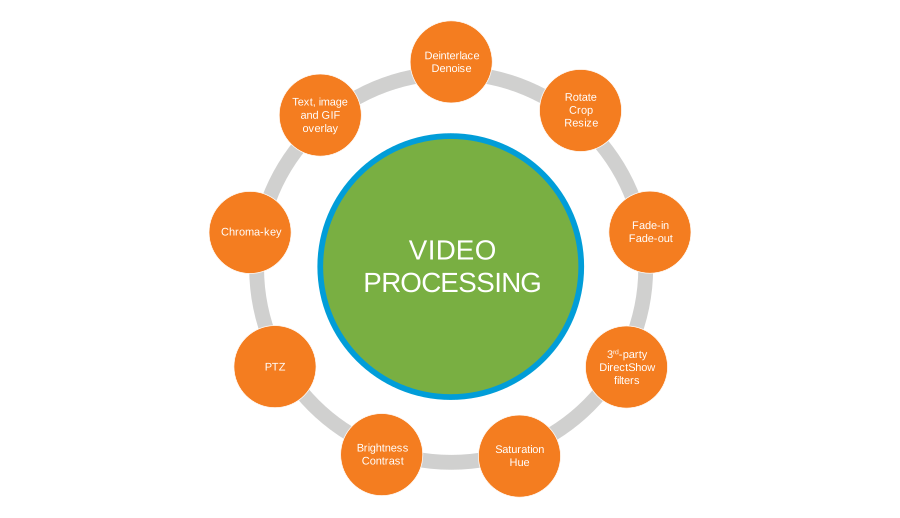
VIDEO PROCESSING
The SDK facilitates the integration of SMPTE-compliant transitions between videos to create smooth, professional-looking transitions. It also enables adding text, images, or GIF logos to your content. Developers can adjust brightness, contrast, saturation, or hue to fine-tune the visual aspects. Furthermore, the SDK supports various operations such as resizing, cropping, and rotating, affording precise control over the video's appearance.
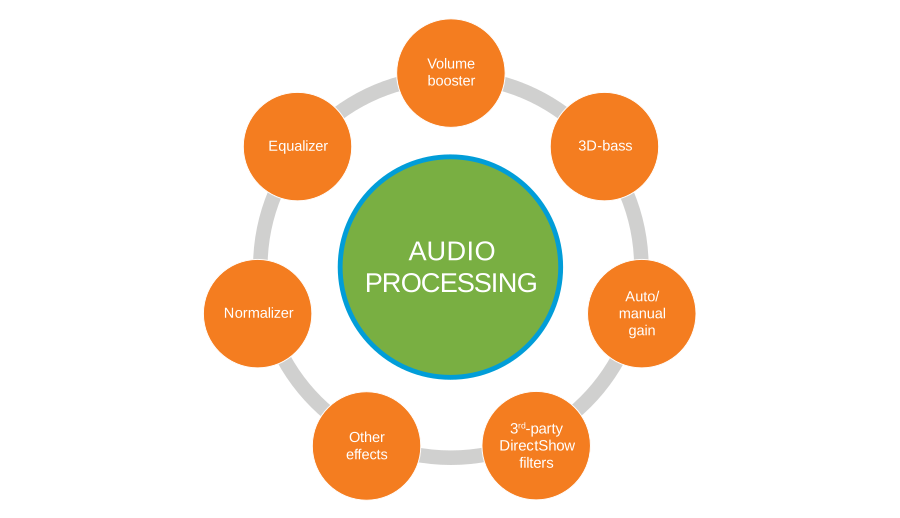
AUDIO PROCESSING
Add an equalizer to your audio processing capabilities with the SDK. This allows you to fine-tune audio frequencies for optimal sound quality. You can also normalize audio levels, increase volume, or enhance bass frequencies to achieve the desired output. The SDK also offers a wide range of other audio effects.
Unity Support
Add a real video editor to Unity 6 with a single, ready-to-import .unitypackage. The high-level VideoEditCoreX engine builds a timeline of clips, applies effects and transitions, previews the result live into a Unity RawImage, and renders the finished movie to MP4. A ready VideoEditX sample scene shows the full preview-and-render flow. One cumulative package targets Windows, Android, macOS, and iOS: import once, switch the Build Target, and build.
High-Level Editing Engine
VideoEditCoreX gives you the same timeline API you use in WinForms, WPF, MAUI, and Avalonia — add clips, trim, sequence, and apply effects and transitions, with no manual pipeline assembly.
One Cumulative Package
Windows, Android, macOS, and iOS native runtimes ship inside a single .unitypackage. Unity picks the right native runtime automatically when you switch the Build Target.
Ready Editing Scene
The included VideoEditX scene composes a multi-clip timeline and renders the preview into a RawImage through the reusable VisioForgeVideoView component, with Stretch, Letterbox, and Crop aspect modes.
Live Timeline Preview
Preview the composed timeline in real time inside Unity before you commit — frames are delivered to the texture through the Unity-only OnVideoFrameUnity event, so editors and creators see exactly what they will get.
Render to MP4
Render the finished timeline to MP4 with hardware-accelerated H.264 / HEVC encoding (NVENC and Quick Sync on Windows, MediaCodec on Android, VideoToolbox on macOS / iOS) — straight from your Unity build.
Render Anywhere in the Scene
The preview frame is uploaded into a Unity Texture2D, so the editor view is not limited to the UI. Show it in a RawImage, or map it onto a material on any 3D object in your scene.
Preview and render a timeline in Unity with VideoEditCoreX
C#// One SDK init (brings up GStreamer); VideoEditCoreX initializes GES in its constructor.
VisioForgeEnvironment.InitializeSdk();
_editor = new VideoEditCoreX();
// Build a timeline by adding clips.
_editor.Input_AddAudioVideoFile("intro.mp4");
_editor.Input_AddAudioVideoFile("main.mp4");
// Preview: no output format → the timeline plays into the Unity texture
// through OnVideoFrameUnity (RGBA32) and VisioForgeVideoView.
_editor.OnVideoFrameUnity += _videoView.OnFrameBuffer;
_editor.Output_Format = null;
_editor.Start();
// To render instead, set an output and start:
// _editor.Output_Format = new MP4Output("result.mp4");
// _editor.Start();Unity editing is delivered through the VideoEditCoreX engine. Verified on Unity 6 (6000.x); requires the .NET Standard 2.1 API Compatibility Level. All four SDKs ship in one cumulative .unitypackage built from the same SDK source as the VisioForge.DotNet.Core NuGet — the package build date and NuGet version are tracked separately.
View Unity documentation →Major Features
VisioForge Video Edit SDK .Net's major features include:
Input Formats
- •Video formats: AVI, MP4, MPEG-1/2, WMV, QuickTime MOV, VP8/VP9, AV1, or any other with a corresponding decoder
- •Audio formats: WAV, MP3, Vorbis, WMA, AAC, Speex, OPUS, or any other with a corresponding decoder
- •Image formats: BMP, PNG, GIF, JPEG, TIFF, WebP
- •In-memory image and video sources for dynamic content generation
Output Video Formats
- •MP4 H264/HEVC + AAC using software, Intel QuickSync, NVIDIA NVENC/CUDA, or AMD Radeon encoders
- •WebM (VP8/VP9 + Vorbis/Opus)
- •AVI with configurable codecs
- •WMV using built-in or external profiles
- •MKV (Matroska) container
- •MPEG-1/2/4 including VCD/SVCD/DVD profiles
- •Animated GIF output
- •Custom output formats via 3rd-party DirectShow filters
Video Processing & Effects
- •Image and graphic overlays (including animated GIF)
- •Transitions between tracks (SMPTE standard)
- •Pan/zoom effects
- •Text overlay with customizable fonts and styles
- •Video transparency and alpha blending
- •Brightness, contrast, saturation, hue adjustments
- •Resize/crop to any resolution
- •Chroma-key (green screen) compositing
- •Denoise and deinterlace filters
- •Fade-in/fade-out effects
- •Rotate and flip transformations
- •30+ additional video effects
Audio Processing & Effects
- •Volume booster
- •10-band equalizer
- •3D-bass system
- •Audio normalization
- •Auto/manual gain control
- •Additional audio effects library
Network Streaming
- •RTSP protocol (H264/AAC)
- •RTMP streaming to YouTube, Facebook, and custom servers
- •HTTP Live Streaming (HLS)
- •Windows Media streaming
- •NDI network streaming
- •UDP and custom FFmpeg-based protocols
Other Features
- •Multi-track timeline with precise segment control
- •3rd-party DirectShow filters support
- •Subtitles support (SRT, ASS, SSA)
- •Motion detection
- •Barcode reader
- •Output to encrypted video (Video Encryption SDK)
- •Output to Virtual Camera SDK
- •Audio/video file tags reading and writing
- •Blackmagic Decklink output
- •madVR video renderer support [Windows only]
Quick Start Code
Get started with professional video editing in minutes
Basic Video Editor Implementation
C#Text & Image Overlay with Color Correction
C#Transitions Between Clips
C#Flexible Licensing Options
Choose the license that best fits your project requirements
Choose Your License
Professional video editing SDK licensing
Annual licenses include 12 months of updates and email support; Lifetime·Team licenses include both for the life of the product
Standard
€750lifetime, €250 / year
- Timeline
- Frame grabber
- Video processing
- Audio processing
- HD video support
- Transitions
- Chroma-key
- OSD (On-Screen Display)
- Multiple output screens
- Output formatsAVI, WMV (Windows Media Video), WMA (Windows Media Audio), WAV, MP3, Ogg Vorbis, Speex
Professional
€1000lifetime, €350 / year
- Timeline
- Frame grabber
- Video processing
- Audio processing
- HD video support
- Transitions
- Network streaming (WMV)
- Chroma-key
- Motion detection
- Video processing using DirectShow filters
- OSD (On-Screen Display)
- Picture-In-Picture
- Multiple output screens
- Virtual Camera SDK output
- Video rotation
- Output formats+, DV video, DV/MPEG-1/2/4 (using a TV tuner with an internal MPEG encoder or DV/HDV camcorder), Flash Video (FLV) using FFMPEG, WebM, Custom output formats using external DirectShow filters
Premium
€1500lifetime, €500 / year
- Timeline
- Frame grabber
- Video processing
- Audio processing
- HD video support
- Transitions
- Network streaming (WMV)
- Network streaming (RTMP/RTSP/UDP)
- Chroma-key
- Motion detection
- Video processing using DirectShow filters
- OSD (On-Screen Display)
- Picture-In-Picture
- Multiple output screens
- GPU-accelerated video effects
- Virtual Camera SDK output
- Video Encryption SDK support
- Video rotation
- Output formats+, MPEG-1/2/4 using FFMPEG, MP4 (H264/HEVC + AAC) using software, Intel QuickSync, Nvidia NVENC/CUDA, or AMD Radeon encoders
Annual licenses cover one named developer; Lifetime·Team licenses cover the purchasing organization's developers at one location in one city. Both include email support.
Annual includes 12 months of minor and major updates. Lifetime·Team includes them for the product lifetime.
Source Code License
Source code licensing is available by request for this SDK. Contact our sales team to discuss pricing and licensing terms.
Request Source Code License💰 Save More with Bundle Packages
This product is included in our cost-effective bundle packages. Get more products for less than buying them separately.
.NET Bundle Professional
Includes:
- •Video Capture SDK .NET (Professional)
- •Media Player SDK .NET (Professional)
- •Video Edit SDK .NET (Professional)
- •Video Edit SDK FFmpeg .NET (Professional)
- •Media Blocks SDK .NET
.NET Bundle Premium
Includes:
- •Video Capture SDK .NET (Premium)
- •Media Player SDK .NET (Premium)
- •Video Edit SDK .NET (Premium)
- •Video Edit SDK FFmpeg .NET (Premium)
- •Media Blocks SDK .NET
System Requirements
Development and deployment requirements for all supported platforms
| Development Systems |
|
| Target Platforms |
|
| .NET Versions |
|
| IDE Support |
|
| Hardware |
|
Distribution Rights
Royalty-free distribution. Deploy your applications without additional fees or runtime licenses. Your end users do not need to purchase any separate license.
Trial Limitations
The fully functional trial lasts 30 days. Depending on the SDK engine and output, it may display a watermark or an unregistered notice.
Free for Non-Commercial Use: The SDK is free for non-commercial use. Please contact us to get a free license.
Developer Resources
Everything you need to get started
Build with AI coding agents
Pairing with an AI agent — Claude Code, Cursor, GitHub Copilot, Gemini CLI, OpenAI Codex? VisioForge publishes machine-readable surfaces for Video Edit SDK .NET so your agent gets the integration right the first time: the right NuGet packages, license registration, project setup, and the cross-platform deployment details it would otherwise have to guess at.
Connect the MCP server
MCPAdd the VisioForge MCP server to your agent for contextual help — search the API, look up classes and members, fetch working code examples, and pull deployment guides, directly inside your editor.
Claude Code
claude mcp add --transport http visioforge-sdk https://mcp.visioforge.com/mcpVS Code (.vscode/mcp.json)
{
  "servers": {
    "visioforge-sdk": {
      "type": "http",
      "url": "https://mcp.visioforge.com/mcp"
    }
  }
}Load an Agent Skill
Agent SkillsWe publish a downloadable skill for every (SDK, platform) combination — for Video Edit SDK .NET, a ready-made SKILL.md per platform (which NuGet packages, license code, csproj setup, common pitfalls) plus a working sample project your agent can copy from. Compatible with Claude Code, Cursor, OpenAI Codex, Gemini CLI and 30+ other agents (Cloudflare Agent Skills RFC).
Point your agent at the skills index
https://www.visioforge.com/.well-known/agent-skills/index.jsonPrefer to feed the entire documentation to your agent? It is also available as plain markdown: /llms.txt · /llms-full.txt
Start Your Free Trial Today
The fully functional trial lasts 30 days. Depending on the SDK engine and output, it may display a watermark or an unregistered notice.
Frequently Asked Questions
How do I cut and merge videos programmatically in C#?
Create a VideoEditCoreX instance, add source files to the timeline with start and end timestamps for trimming, arrange clips in the desired order, set the output format, and call Start(). The SDK handles frame-accurate cutting, re-encoding, and audio synchronization automatically.
What output formats does the Video Edit SDK support?
The SDK supports MP4 (H.264/H.265), WebM (VP8/VP9), AVI, WMV, MKV, MPEG-1/2/4, and GIF output. Audio can be exported as MP3, AAC, OGG Vorbis, OPUS, FLAC, and WAV. You can also configure custom encoding parameters for bitrate, resolution, and frame rate.
Can I add effects and transitions between video clips?
Yes. The SDK includes 50+ built-in video effects such as blur, sharpen, color correction, chroma key, and picture-in-picture. You can add smooth transitions between clips, overlay text and images with customizable positioning, and apply real-time audio effects.
Does the SDK support batch video conversion?
Yes. You can process multiple files in sequence or parallel. Set up conversion jobs with source files, target formats, and encoding parameters. The SDK supports format conversion, resolution scaling, frame rate adjustment, and audio re-encoding in batch mode.
Is hardware-accelerated encoding available for video editing?
Yes. The SDK supports GPU-accelerated encoding via NVIDIA NVENC, Intel Quick Sync Video, and AMD AMF. Hardware encoding dramatically speeds up video export operations, especially for high-resolution content like 4K video.
What platforms are supported for video editing?
The SDK supports WinForms, WPF, MAUI, Uno Platform, and Avalonia on Windows. Cross-platform editing works on macOS, Linux, iOS, and Android. Both .NET Framework 4.7.2+ and .NET 6/8/9+ are supported.
Can I edit or render video in Unity?
Yes. Video Edit SDK .NET ships a ready-to-import .unitypackage. The VideoEditCoreX engine builds a timeline of clips with effects and transitions, previews it live into a Unity Texture2D, and renders the result to MP4 — all from inside your Unity build, on Windows, Android, macOS, and iOS.
Can I render a timeline to MP4 from a Unity app?
Yes. After composing the timeline, set an MP4 output and start the VideoEditCoreX engine to render the finished movie to disk with hardware-accelerated H.264 / HEVC encoding (NVENC and Quick Sync on Windows, MediaCodec on Android, VideoToolbox on macOS / iOS).