VisioForge Project Templates
Video Capture SDK .NET Media Blocks SDK .NET Media Player SDK .NET
The VisioForge project templates create a small, complete .NET 10 app that already works: a camera preview, a media player or a Media Blocks player. The NuGet packages are referenced, the SDK is initialized and shut down, and the video view is in place. Build it, press F5 and extend it from there.
The templates come two ways: the VisioForge .NET Media SDK Templates extension for Visual Studio 2026, and the VisioForge.DotNet.Templates package for dotnet new. Both carry the same eight templates.
Templates
| Template | Short name | SDK | Platforms |
|---|---|---|---|
| VisioForge Video Capture App (WPF) | vf-capture-wpf | Video Capture SDK .NET | Windows x64 |
| VisioForge Video Capture App (WinForms) | vf-capture-winforms | Video Capture SDK .NET | Windows x64 |
| VisioForge Video Capture App (Avalonia) | vf-capture-avalonia | Video Capture SDK .NET | Windows x64; macOS and Linux when built on them |
| VisioForge Video Capture App (.NET MAUI) | vf-capture-maui | Video Capture SDK .NET | Windows x64; iOS and Mac Catalyst when built on macOS |
| VisioForge Media Player App (WPF) | vf-player-wpf | Media Player SDK .NET | Windows x64 |
| VisioForge Media Player App (WinForms) | vf-player-winforms | Media Player SDK .NET | Windows x64 |
| VisioForge Media Blocks Player App (WPF) | vf-mediablocks-wpf | Media Blocks SDK .NET | Windows x64 |
| VisioForge Media Blocks Player App (WinForms) | vf-mediablocks-winforms | Media Blocks SDK .NET | Windows x64 |
The capture templates open the first camera and show its preview; a list or a button switches cameras. The player templates have Open file... and Stop buttons and play any file the SDK can decode.
Requirements
- The .NET 10 SDK. Visual Studio 2026 installs it; with Visual Studio 2022, install it separately.
- MAUI template: the
mauiworkload (dotnet workload install maui, or the .NET MAUI workload in the Visual Studio installer). Its Windows app is a packaged MSIX: run it from Visual Studio 2026, not withdotnet run. iOS and Mac Catalyst build on a Mac with Xcode: run Mac Catalyst withdotnet run -f net10.0-maccatalyst; for iOS, which needs a physical device, see MAUI. - Avalonia template: Xcode and the
macosworkload (dotnet workload install macos) on a Mac; the system GStreamer on Linux, installed as described in Ubuntu.
Install in Visual Studio 2026
- Open Extensions → Manage Extensions, search for VisioForge .NET Media SDK Templates and click Install.
- Restart Visual Studio so the extension is installed.
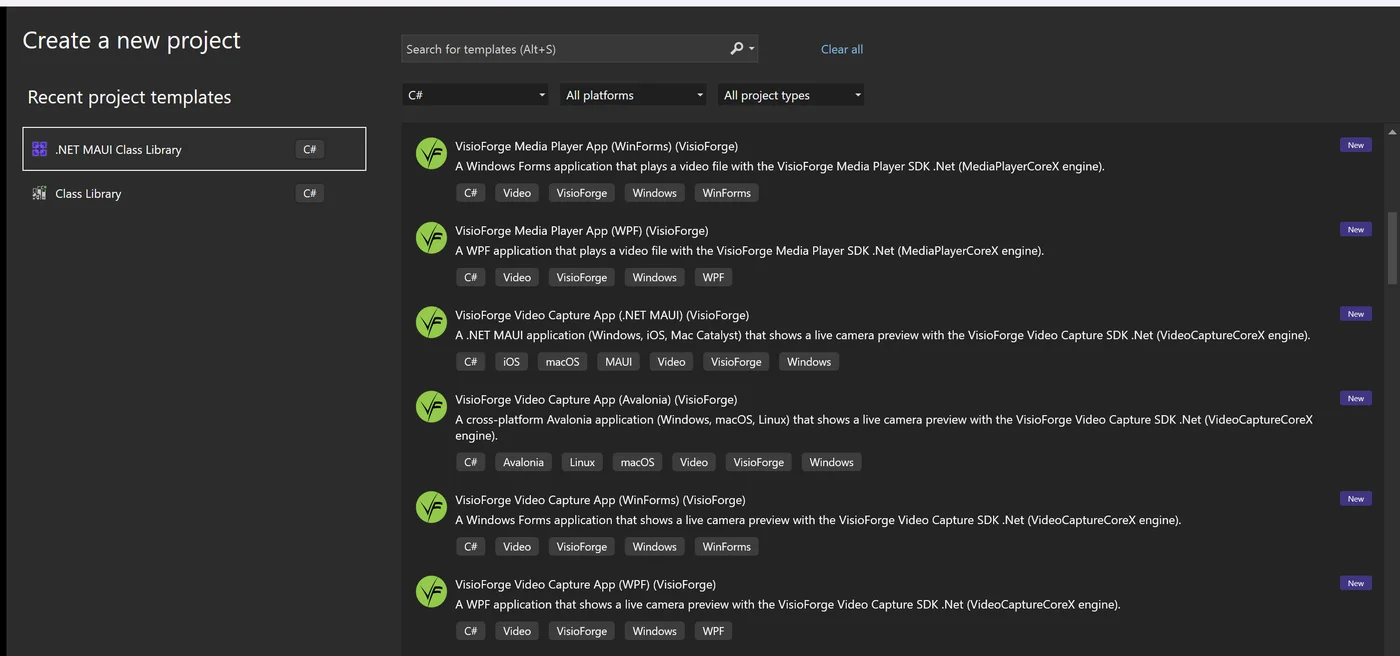
- Open File → New → Project and search for VisioForge.
- Pick a template, name the project and click Create.
- Press F5.
Visual Studio 2022
The extension installs into Visual Studio 2026 only. The templates target .NET 10, which Visual Studio 2022 does not support. With Visual Studio 2022, use the command line below instead: the WPF, WinForms and Avalonia templates build and run with dotnet run. The Windows app of the MAUI template needs Visual Studio 2026. To add the SDK to a project of your own, see Visual Studio.
Install from the Command Line
dotnet new install VisioForge.DotNet.Templates
dotnet new vf-capture-wpf -n MyCaptureApp
cd MyCaptureApp
dotnet run
dotnet new list VisioForge shows the installed VisioForge templates, and dotnet new update moves them to the newest release. The project name you give with -n becomes the namespace and, in the MAUI and Avalonia templates, part of the bundle identifier com.example.<name>, lowercased and stripped to letters and digits (app when nothing is left). Replace com.example with your own prefix before you sign or publish the app.
What a Template Contains
- The SDK NuGet packages at exact versions: the SDK, the native redist for the target platform and, for MAUI and Avalonia, the UI package.
- A main window that calls
VisioForgeX.InitSDKAsyncwhen it loads andVisioForgeX.DestroySDKwhen it closes. Closing waits for the engine to stop first. - The engine and its video view:
VideoCaptureCoreXwith the camera list,MediaPlayerCoreX, or aMediaBlocksPipelinewith a universal source, a video renderer and an audio renderer.
The first start on a machine takes longer: the SDK builds its plugin registry once. The SDKs run in trial mode without a license key.
Next Steps
- Visual Studio — add the SDK to an existing project.
- Avalonia and MAUI — add the SDK to a cross-platform app of your own.
- Samples on GitHub — larger demos for every SDK.